Minoila: Integrating an Elegant Script Font into Your Creative Process
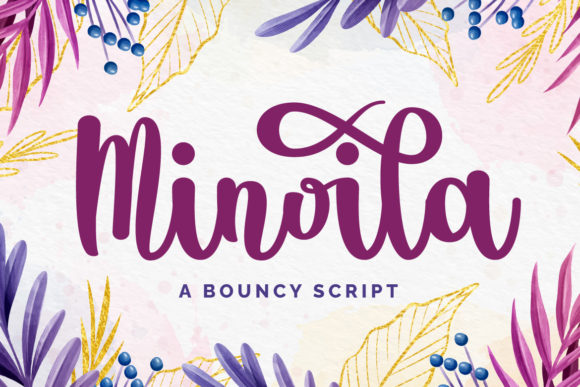
For professionals and creatives handling visual projects, the choice of a font is more than a stylistic decision; it’s a foundational step in the execution of your work. Minoila enters this workflow as a specialized tool—a beautiful and elegant script font designed to convey authenticity and grace. Its integration is not an afterthought but a deliberate action that influences the planning, execution, and final quality of your output.
Understanding Minoila’s Role in Project Planning
Before you begin designing a wedding invitation or drafting a social media campaign, you assess your assets. Minoila fits into this preparatory phase as a key resource. Its authentic feel establishes the emotional tone of your project from the outset. When planning, you consider compatibility: will this font work with your design software? Is its character set sufficient for your needs? Here, Minoila’s PUA encoding becomes a critical planning factor. This encoding means every glyph and swash is accessible, eliminating a common workflow obstacle where designers struggle to access alternate characters. You can plan with confidence, knowing the full aesthetic range of Minoila is available during execution.
Minoila in Execution: From Stationery to Social Media
The practical implementation of Minoila varies across projects, but the core process remains consistent. For a stationery artist creating a wedding suite, the workflow involves selecting Minoila within their vector or layout software, applying it to text elements, and then utilizing its swashes to add custom flourishes on names or dates. This direct manipulation during the execution phase elevates the design without requiring external plugins or complicated maneuvers.
Similarly, a marketer crafting an eye-catching social media post follows a parallel process. They might pair Minoila with a bold sans-serif font for contrast, using the script for the primary headline or call-out quote. The ease of access to all glyphs ensures that during the rapid execution typical of content creation, they aren’t slowed down by technical limitations. The font becomes a reliable, quality-controlled asset that produces consistent visual results across posts.
Integration with Other Tools and Resources
A font never works alone; it interacts with other tools in your creative ecosystem. Minoila’s compatibility with standard design platforms like Adobe Suite, Canva, or Affinity Designer is a baseline requirement for smooth integration. Once installed, it functions as any other system font, but its PUA encoding allows it to interact more deeply with software that supports character panels or glyph palettes.
Your workflow might also involve other assets, such as stock photography, color palettes, or branding guidelines. Minoila’s elegant script style must harmonize with these elements. A practical tip for integration is to create a test document during your project’s preparation stage. Place Minoila alongside your key images and colors to evaluate visual cohesion before full-scale execution. This small step in organization prevents mid-project redesigns and maintains efficiency.
Workflow Examples for Different Creators
Consider a freelance graphic designer specializing in greeting cards. Their process for a new line might start with conceptual sketches, then move to digital drafts. Minoila is introduced in the digital phase for heartfelt messages and tags. Because the font is PUA encoded, they can quickly cycle through different swash options for the word “Love” or “Thank You” to find the perfect match for each card’s illustration, streamlining the iteration process.
For a small business owner managing their own branding, the use of Minoila might be more strategic. They could decide to use it exclusively for special announcements or holiday sale graphics, creating a consistent visual cue for their audience. This decision integrates into a broader content calendar and marketing workflow. The owner prepares a template in their design tool with Minoila preset for these specific uses, ensuring long-term consistency and saving time during the hectic execution of promotional campaigns.
Factors for Long-Term Use and Quality Control
Adopting a new font like Minoila isn’t just for a single project; it’s about incorporating a lasting asset into your creative library. Factors like usability and organization come into play. After your initial use, take a moment to organize your font files. Perhaps create a digital swipe file of sample layouts you’ve made with Minoila. This serves as a quality control reference for future projects, ensuring you maintain the same high standard of application.
Efficiency over time is also enhanced by familiarity. As you use Minoila repeatedly, you’ll memorize which swashes work best for certain words or which glyph alternates fit particular layouts. This accumulated knowledge speeds up your execution phase in subsequent projects. The font’s design, being inherently legible yet ornate, also aids in quality control by reducing the risk of the final product looking cluttered or unreadable—a common pitfall with more extreme script fonts.
Practical Implementation Tips for Everyday Use
To integrate Minoila smoothly into your routine, start with a controlled application. Don’t overhaul all your templates immediately. Instead, implement it in one new project, such as a personal greeting card or a single social media series. Observe how it fits into your specific steps: from font selection, to text input, to adjustment of swashes, to final export. This hands-on observation provides workflow insights that generic tutorials cannot.
Another practical tip concerns preparation for collaboration. If your workflow involves sharing files with clients or printers, ensure they have access to the font or that your exported PDFs embed the glyphs correctly. Minoila’s PUA encoding generally supports robust embedding, but verifying this during your preparation phase prevents delivery issues. This attention to compatibility safeguards the professional execution of your project.
Minoila Across the Creative Process Timeline
The application of Minoila can occur at different points in your project timeline. In a lengthy process like designing a full wedding stationery suite, it’s used early during the drafting of invitations and revisited later for ancillary items like place cards or thank-you notes. This repeated use across the project lifecycle demands that the font remain a stable, reliable element—which its technical encoding supports.
For a quicker task, like creating a blog feature image, Minoila might be used right at the final execution stage to add a polished title overlay. The decision to use it is made during the task itself, based on the desired outcome of eye-catching elegance. Its ease of access allows for this last-minute, high-quality implementation without disrupting the overall workflow efficiency.
Ultimately, Minoila serves as a versatile component within a structured creative or professional process. Its value lies not just in its beautiful appearance, but in how its design and PUA encoding facilitate a smoother journey from project conception through to final execution. By understanding its role and integrating it with intention, you turn a lovely font into a practical tool that consistently enhances the quality and authenticity of your work.